
Introducing the Rich Text Editor
Introducing the Rich Text Editor
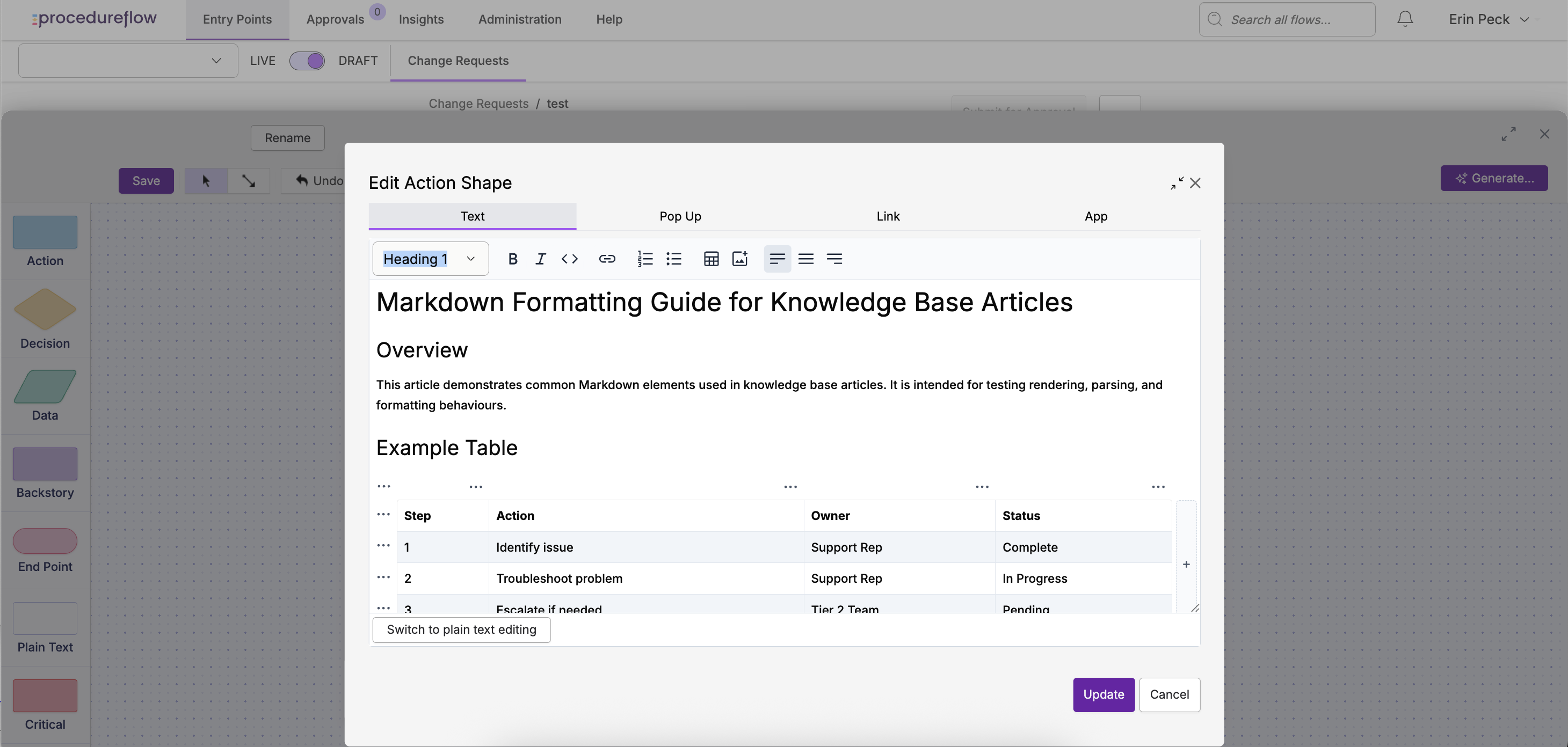
Procedureflow now includes a Rich Text Editor that makes creating and editing content easier and more visual.
Instead of needing to write Markdown formatting manually, you can now format text using a familiar editing toolbar - similar to tools like Word or Google Docs.
The Rich Text Editor helps teams create and maintain content more quickly while preserving Procedureflow’s powerful linking and knowledge structure.
Why Procedureflow introduced the Rich Text Editor
Many Procedureflow users create and maintain large amounts of written content inside flows. While Markdown is powerful, it can also be difficult to remember and time-consuming to use for everyday editing.
Based on customer feedback, we introduced the Rich Text Editor to make content creation faster and easier.
The Rich Text Editor helps by:
- Reducing the need to remember Markdown formatting
- Making it easier to create structured content such as tables and lists
- Allowing users to copy and paste formatted content from other web-based sources
- Providing a more familiar editing experience for occasional authors
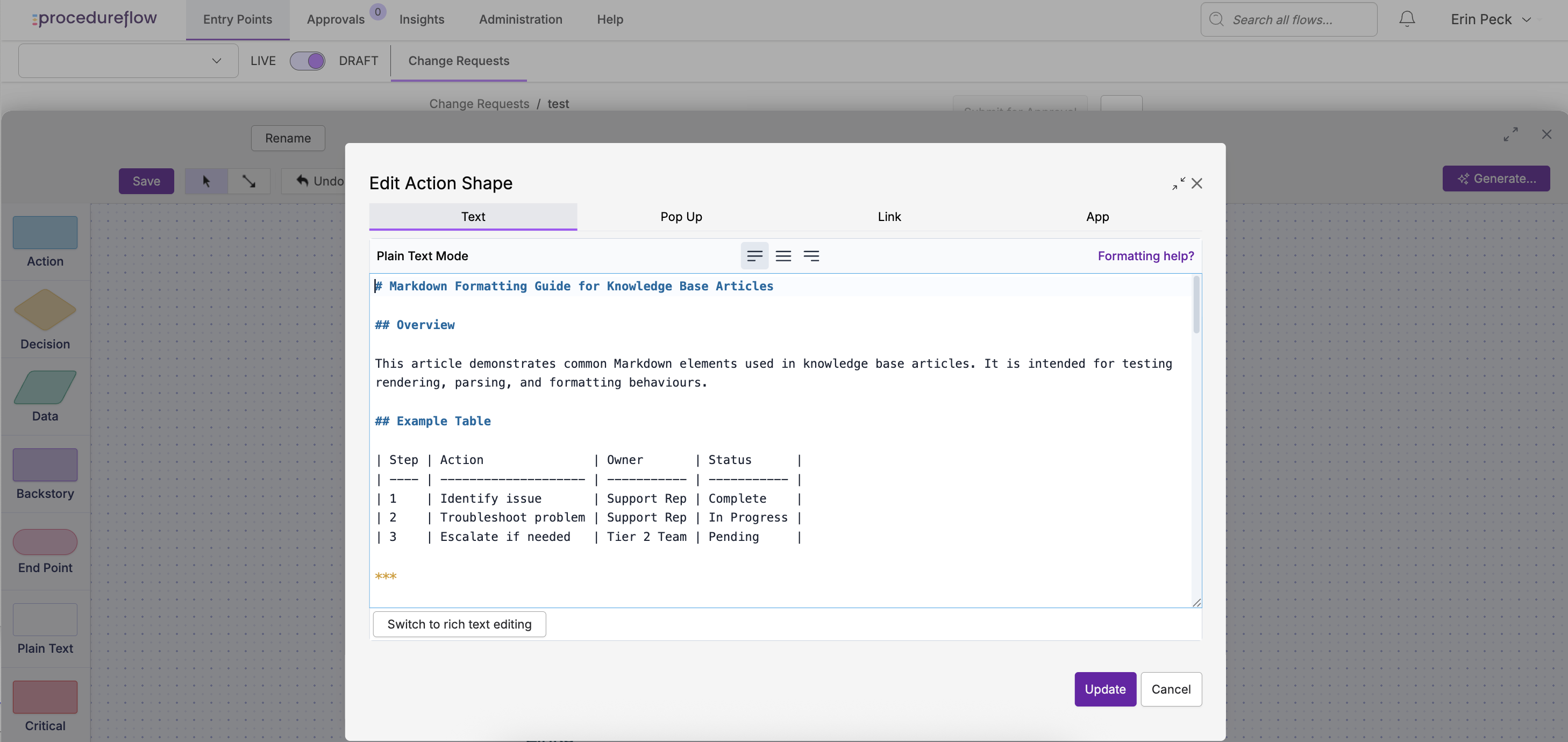
For users who prefer working with Markdown, Plain Text mode is still available, and you can switch between Rich Text and Plain Text when editing a shape.
What happened to the previous editor?
The previous editing experience has been replaced by a new editor that supports both Rich Text and Plain Text modes.
Most shapes will open in Rich Text mode, which provides a visual editing experience with formatting tools.
Plain Text mode is also available for users who prefer working directly with Markdown. You can switch between Rich Text and Plain Text when editing a shape.
In some cases, shapes created with older formatting may open in Plain Text mode and require an upgrade before Rich Text editing can be used. For instructions, see Upgrading Shapes for the Rich Text Editor.
What’s new
The Rich Text Editor introduces several improvements to the editing experience.
Visual formatting tools
You can now apply formatting using toolbar buttons instead of Markdown syntax.
For example, you can easily:
- Create and edit tables
- Format headings and paragraphs
- Copy and paste formatted text, while retaining much of the original formatting*
- Create bulleted or numbered lists
- Insert links
- Bold or italicize text
This allows you to format content without needing to know Markdown.
Edit content exactly as it appears
The Rich Text Editor lets you edit content visually, so what you see while editing closely matches how the content will appear in the flow. This removes the need to interpret Markdown formatting while writing.
*A note on pasting formatted text - our new rich text editor supports standard web content. Pasting from web pages, emails, and other markdown sources works reliably. Pasting from desktop apps like Microsoft Word or Google Docs may result in some lost formatting due to discrepancies with their proprietary markdown libraries.
Switching between Rich Text and Plain Text
Procedureflow supports two editing modes:
Rich Text
A visual editor with formatting tools.
Plain Text
An editor that shows the underlying Markdown formatting.
You can switch between these modes when editing a shape.
The default editing mode will be Rich Text, but Plain Text remains available for users who want to edit Markdown directly. Markdown formatting options are explained in our Formatting Text article.
Tip Procedureflow remembers the last editing mode you used, so shapes will open in that mode next time you edit (unless your browser cache or cookies are cleared).
Why some shapes require an upgrade
Most shapes in Procedureflow are automatically compatible with the Rich Text Editor.
However, a small number of legacy shapes contain formatting patterns that cannot be automatically converted.
When this happens, the shape must be upgraded before Rich Text editing can be used.
During this process, you may need to correct some formatting issues.
For detailed instructions, see Upgrading Shapes for the Rich Text Editor
Tips for working with the Rich Text Editor
- Use the toolbar to apply formatting instead of writing Markdown manually
- In rich text mode, pressing Enter creates a new paragraph. To add a line break within the same paragraph, press Shift + Enter.
- When upgrading older shapes, you may need to correct some Markdown formatting
- If fixing formatting is difficult, you can recreate the content using the Rich Text Editor
Accédez à cet article en français